Ten years passed.
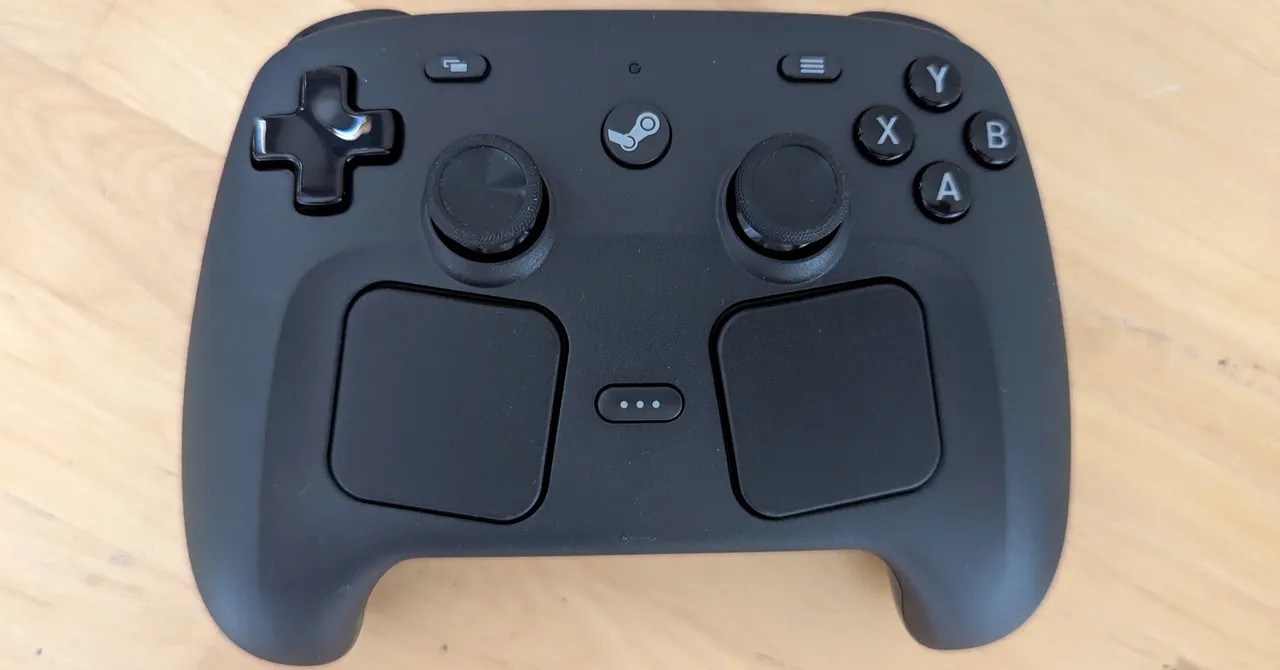
Valve is back with a new controller, shedding the awkward shapes and bizarre trackpads of the original. They went conventional this time. Mostly. Except for some slightly different trackpads, of course. It fits in a normal hand now, no longer splaying your fingers like a starfish.
But here’s the weird part. Timing.
The controller launches into a void. It’s supposed to pair with the new Steam Machine—that console-style gaming PC Valve has been promising forever. Also the Steam Frame VR headset. Both are late. Very late. The AI boom has drained the world of RAM and GPUs like a black hole, leaving hardware teams with empty shelves. No release date for the Machine. No price tag either. Just silence.
The Steam Controller doesn’t care. Gamepads don’t need graphics cards. So Valve released this one alone.
It sits on your desk, divorced from its purpose.
All the buttons
The pad is dense.
Almost overwhelmingly so. It packs every input method from the Steam Deck—except the touchscreen—into a chunk of plastic 11 cm wide. It weighs 292 grams, barely anything for how much is inside. You barely feel it after a four-hour session.
The layout is a hybrid.
Face buttons use Xbox’s ABXY scheme, familiar to anyone who’s held an Xpad. But the sticks? Symmetrical. Like PlayStation. Shoulder buttons and analog triggers are there too. If you know your console history, you adapt in minutes. It clicks into muscle memory.
Then you find the extras.
Neither Sony nor Microsoft offers these on their default controllers. Four buttons live under your fingers on the grip underside. The thumbsticks are clickable, sensitive to capacitive touch, and built with tunnel magnetoresistance (TMR) sensors. TMR is more precise and durable than the Hall effect sensors found elsewhere.
There’s a gyro. An accelerometer. Rumble engines that get fancy, vibrating so fast the pad acts like a speaker. You can hear audio tricks, maybe even a hidden Wilhelm Scream if you’re lucky. And then there are the trackpads from the Deck, sitting at the bottom, waiting for your thumbs.
Most thumbs prefer stick positions.
To reach the sticks on this new pad, you have to shift your grip. The trackpads occupy prime real estate, crowding the sticks further back. It takes adjustment. The D-pad doesn’t help much, either—it works fine but lacks edges and has a glossy finish that slips away in sweat. Cheap feel amidst high-end build.
The charging “puck” is adorable.
It magnetically clips to the rear. Acts as both dock and wireless dongle. Plug the USB-C cable into the PC, press the Steam button, and you’re connected. Zero latency. No drivers. It just works. A rare win.
Press the Steam button again and Big Picture Mode kicks in.
Your PC transforms. Chunky tiles, bold text, large icons designed for couch viewing. Steam must already be open for this trick—it’s not a magic wake-up remote yet. But navigating the library feels clean, simple.
First test
I started with Aperture Desk Job.
It made sense. Valve built the game to test the Steam Deck, so it should respect the hardware. The controller handled it well, mostly. Mimicked the handheld features. One moment relied on the Deck’s touchscreen though. When using the controller, the trackpad should act as a mouse cursor. It didn’t. Nothing happened. Just a dead zone.
The gyro was worse.
Defaulted off, apparently. Even when I forced it on via “Grip Sense”—a ridge on the underside meant to detect your hand—the calibration felt wrong. I’m not sure how the detection logic works because my hand covers the ridge always. Why map a sensor to a zone I never lift my hand from? It feels lazy. You can force it always on or map a button toggle, but it should work out of the box. It didn’t.
Customs Clearance
Here is where it shines.
Steam’s software is absurdly customizable. Launch any game, and the UI shows exactly which inputs are mapped. Stick to the action game presets, sure. But if you hate them? Remap everything. Every button. Every dead zone. Every trigger curve.
The quick menu via the Steam button is handy. Change gyro behavior instantly. Assign rear grip buttons. Adjust trackpad sensitivity. You can drop responsiveness to 25% or crank it to 3,000%. The trackpads even offer haptic feedback, a tiny buzz that links your thumb motion to onscreen action. It helps build a sensory bridge.
For players who want to tailor their experience down to the millimeter, it is a dream.
Accessibility isn’t marketed as the feature. But it is. People who struggle with traditional buttons can find setups that work. That is good.
Walled Garden
But there’s a catch. A big one.
This pad is only for Steam.
Not just for Valve hardware. For the store.
Most PC controllers speak XInput, a language Windows understands universally. Put any pad near a game installed from Epic Games Store or GOG, and it works. The Steam Controller uses Steam Input, Valve’s custom protocol.
Your PC won’t even recognize it as a generic gamepad.
I tested Guacamelee! from the Epic Store. It was a disaster. Jump mapped to talk. X button opened a virtual keyboard instead of attacking. Half the inputs registered. Half disappeared. And because the customization happens entirely in Steam, you can’t remap keys in-game. You are locked out.
So who is this for?
TV gamers waiting for a machine that doesn’t exist.
If you have a Steam Deck docked, sure. Use the controller with that. But that feels like a workaround, a jerry-rigged solution for an unfinished ecosystem. For general PC gaming? You’ll have your mouse nearby. You’ll likely install a non-Steam indie game that breaks. The trackpads are useless outside their intended context.
The Steam Controller is impressive. It feels great in the hand. It offers options no other pad dares to touch. But right now?
It’s a luxury item for a void.