


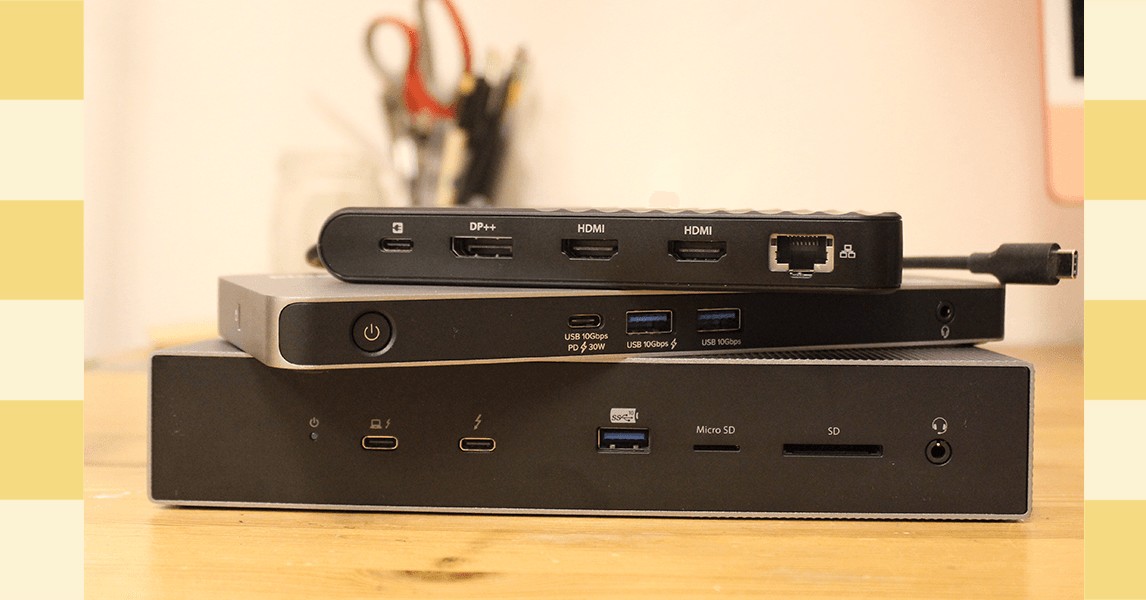
Connecting a laptop to a full workstation setup shouldn’t mean untangling cables or missing essential ports. Laptop docking stations solve this problem by offering a streamlined connection to monitors, peripherals, and high-speed data transfers. This guide reviews the best options available in 2026, from budget-friendly models to high-performance Thunderbolt 5 docks.
Why Docking Stations Matter
Modern laptops prioritize portability over port selection. Many newer machines lack essential connections like full-size USB-A, Ethernet, or even multiple display outputs. A docking station bridges this gap, turning a laptop into a fully functional desktop with a single cable connection. This is especially crucial for professionals who need to quickly transition between mobile work and a feature-rich workspace.
The market is flooded with options, making it difficult to choose. Testing reveals that the best docks aren’t necessarily the most expensive; the ideal choice depends on individual needs and use cases.
Top Picks for 2026
CalDigit TS5 Plus: The Premium All-Rounder ($500)
The CalDigit TS5 Plus is the top pick for serious users who demand maximum connectivity and performance. It features the latest Thunderbolt 5 technology, delivering unparalleled data transfer speeds and display support. The dock offers a comprehensive array of ports, including multiple USB-C and USB-A, an SD card reader, a 10Gb Ethernet jack, and a 3.5mm audio port.
Despite its hefty price tag, the TS5 Plus justifies the cost with its reliability and future-proofing. The exterior power brick ensures stable operation, though it’s bulky. The lack of HDMI ports may require adapters for older monitors, but the overall functionality is unmatched.
Key Specs:
- Ports: 5x USB-A 3.2 Gen 2 (10 Gbps), 2x USB-C Thunderbolt 5, 1x USB-C 3.2 Gen 2 (10 Gbps, 36W), 1x USB-C host (140W), 1x DisplayPort 2.1, 1x MicroSD, 1x SD, 1x 10GbE Ethernet, 1x Audio In/Out
- Power Delivery: 330W (external brick)
Plugable USB-C Dual HDMI Display Horizontal Docking Station: The Affordable Option ($120–$140)
For users on a budget, the Plugable USB-C Dual HDMI Display Horizontal Docking Station provides excellent value. It supports two monitors via HDMI and offers a solid collection of USB ports, though some are slower USB 3.0. The plastic build isn’t as premium as metal docks, but it’s suitable for stationary use.
This dock excels at basic connectivity, making it ideal for home offices or casual workstations. While not as feature-rich as high-end models, it delivers essential functionality at a fraction of the cost.
Key Specs:
- Ports: 2x USB-A 3.0 (5 Gbps), 1x USB-A 2.0 (480 Mbps), 1x USB-C 3.0 (5 Gbps), 1x USB-C PD (65W), 2x HDMI 2.0 (4K at 60 Hz), 1x Gigabit Ethernet, 1x 3.5mm Audio Out
Kensington Thunderbolt 5 Triple 4K Docking Station: A Balanced Choice ($270 on Sale)
The Kensington Thunderbolt 5 Triple 4K Docking Station strikes a balance between price and performance. Its bulky aluminum chassis houses three Thunderbolt 5 downstream ports, three USB-A ports, and an Ethernet jack. The inclusion of a manual power button is a welcome addition.
Like other high-end docks, the Kensington model lacks HDMI, requiring USB-C or DisplayPort connections for monitors. However, its discounted price makes it a competitive option for users seeking Thunderbolt 5 without the premium cost of the CalDigit TS5 Plus.
Key Specs:
- Ports: 3x Thunderbolt 5 downstream, 1x Thunderbolt 5 host, 3x USB-A 3.2 Gen2 (10 Gbps), 1x Headphone jack, 1x SD, 1x MicroSD, 1x 2.5 GbE Ethernet
Specialized Options
Satechi Dual Dock Stand: The Portable Hybrid ($110–$170)
The Satechi Dual Dock Stand stands out by combining docking functionality with laptop elevation for better ergonomics. It includes USB ports, HDMI outputs, and an NVMe SSD slot for additional storage. The dock connects via USB-C and supports two 4K displays.
Plugable USB-C 5-Display Docking Station (UD-7400PD): The Multi-Monitor King ($294)
For users who need to connect five displays, the Plugable USB-C 5-Display Docking Station is the only choice. It utilizes DisplayLink technology to achieve this, but the driver dependency means limited performance.
Conclusion
The best laptop docking station depends on your priorities. The CalDigit TS5 Plus remains the top pick for professionals who demand the highest performance and connectivity. However, the Plugable USB-C Dual HDMI Display Horizontal Docking Station offers excellent value for budget-conscious users. Ultimately, choosing the right dock simplifies workspace setup and maximizes laptop functionality.


